

In 2026, mobile gaming has reached a new level of competitiveness and engagement. From idle RPGs to clicker simulators and strategy-based farming games, players are constantly looking for ways to optimize their time and performance.
This is where the mobile auto clicker becomes a powerful tool. A mobile auto clicker allows users to automate repetitive taps and gestures on their smartphones, helping them save time and improve efficiency in games and apps.
Whether you’re a casual gamer or a competitive player, a smartphone auto clicker can significantly enhance your mobile experience. In this comprehensive guide, we’ll explore how phone auto clickers work, their benefits, the setup process, best use cases, and what to expect in 2026.
Table of Contents
What is a Mobile Auto Clicker?
A mobile auto clicker is a mobile clicking app designed to simulate taps, swipes, and gestures automatically on your smartphone screen. Instead of manually tapping hundreds or thousands of times, the app performs those actions for you at a customized speed and interval.
A phone auto clicker works by overlaying control points on your screen. These points indicate where the taps will occur. Users can configure:
- Tap frequency (clicks per second)
- Duration of clicking
- Single or multiple click points
- Swipe automation patterns
In 2026, modern smartphone clicking tools come with advanced features like gesture recording, multi-touch simulation, and customizable automation sequences.
Why Mobile Gaming Needs Automation in 2026?
Mobile games today are more advanced and time-consuming than ever before. Many games include:
- Idle farming mechanics
- Resource grinding
- Repetitive tapping tasks
- Event-based click challenges
An auto clicker for mobile games reduces manual effort while maintaining consistent gameplay. Instead of spending hours tapping your screen, you can automate repetitive tasks and focus on strategy.
For example:
- In idle RPGs, you can automate attack tapping.
- In farming simulators, you can auto-harvest crops.
- In clicker games, you can maximize score growth automatically.
This makes a mobile gaming auto clicker a practical phone automation tool for serious gamers.
How a Smartphone Auto Clicker Works?
A smartphone auto clicker setup is typically simple and user-friendly. Here’s how it works:
1. Accessibility Permissions
Most mobile clicking apps require accessibility permissions to control taps on your device. Once enabled, the app can simulate screen touches.
2. Floating Control Panel
The app displays a floating interface on your screen. You can:
- Add tap points
- Adjust intervals
- Set loop duration
3. Multi-Point Automation
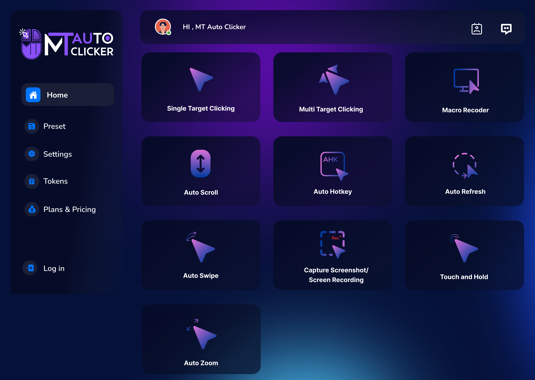
Advanced mobile phone auto clicker apps allow multiple tap locations. This is useful in strategy or battle games where multiple buttons must be clicked.
4. Gesture Recording
Some tools let you record your actions once and replay them automatically. This is ideal for repetitive gameplay loops.
Key Features of a Modern Phone Auto Clicker (2026 Edition)
In 2026, the best smartphone auto clicker apps offer powerful features:
- Adjustable Click Speed: From slow intervals to ultra-fast taps per second.
- Multi-Touch Simulation: Simulates multiple fingers tapping at once.
- Swipe & Gesture Support: Automates drag-and-drop, scrolling, or swiping patterns.
- Game-Specific Profiles: Save presets for different mobile games.
- Loop & Schedule Mode: Run automation for a fixed time or continuously.
- Battery Optimization: Efficient background operation to reduce power consumption.
These features transform a simple phone automation tool into a smart productivity assistant for gamers.
Benefits of Using a Mobile Auto Clicker
- Time Efficiency: Instead of manually grinding resources, automation handles repetitive tasks.
- Reduced Finger Fatigue: Continuous tapping can strain fingers and wrists. A mobile clicking app eliminates this issue.
- Improved Game Progression: Automated clicking ensures consistent performance, especially in idle or incremental games.
- Multitasking Capability: You can run your automation while focusing on strategy planning or other tasks.
- Competitive Advantage: In some scenarios, controlled automation provides better precision and speed.
Auto Clicker for Mobile Games: Popular Use Cases
A mobile gaming auto clicker is commonly used in:
- Idle clicker games
- MMORPG grinding sessions
- Farming simulators
- Strategy war games
- Reward-based tapping apps
For example, if a game requires 10,000 taps to unlock a reward, a smartphone auto clicker can complete the task consistently without human error. However, always check the game’s terms of service. Some games may restrict automation tools.
Smartphone Auto Clicker Setup Guide (Step-by-Step)
Setting up a smartphone auto clicker setup in 2026 typically follows these steps:
- Install a trusted mobile clicking app from the official app store.
- Enable accessibility permissions.
- Open the target mobile game.
- Add click points where tapping is needed.
- Adjust click interval and speed.
- Start the automation process.
For advanced users:
- Configure multi-touch for battle games.
- Set loops for farming cycles.
- Save presets for different gameplay modes.
Always test your setup at a moderate speed before running high-frequency automation.
Is Using a Phone Auto Clicker Safe?
A mobile phone auto clicker is generally safe when:
- Downloaded from official sources
- Used within personal devices
- Not violating game policies
Security tips:
- Avoid unofficial APK files.
- Review app permissions carefully.
- Do not share personal credentials.
In 2026, many apps include built-in safety systems to prevent overheating and battery drain.
Ethical and Responsible Usage
While automation enhances productivity, it’s important to use it responsibly:
- Do not use in competitive multiplayer games where it’s prohibited.
- Respect community guidelines.
- Avoid exploiting system loopholes.
A mobile auto clicker should enhance convenience—not create unfair advantages.
The Future of Smartphone Auto Clicker in 2026 and Beyond
Mobile automation tools are evolving rapidly. Upcoming advancements may include:
- AI-based adaptive clicking
- Smart gesture prediction
- Game-mode detection
- Cloud-based automation profiles
A next-generation smartphone auto clicker might analyze gameplay patterns and automatically adjust tap frequency for optimal performance. The future of mobile gaming auto clicker tools lies in smarter automation, improved battery management, and seamless user experience.
Final Thoughts
A mobile auto clicker is more than just a tapping tool—it’s a smart productivity companion for modern mobile gamers. Whether you call it a phone auto clicker, mobile phone auto clicker, or smartphone auto clicker, the core purpose remains the same: automate repetitive tasks and improve efficiency.
In 2026, as smartphone gaming becomes more immersive and demanding, automation tools will continue to grow in popularity. With proper setup and responsible use, a mobile clicking app can help you save time, reduce fatigue, and enhance gameplay performance.
If you’re serious about optimizing your mobile gaming strategy, investing time in learning the right smartphone auto clicker setup can make all the difference. Automation is no longer optional—it’s the future of smart gaming.