
Click-based and idle games are designed around repetition. Whether you’re tapping to earn coins, upgrading characters, or grinding resources, the same actions are performed again and again. Over time, this can become tiring and inefficient. That’s where auto clicker settings come in—they automate repetitive actions and help you progress faster.
But here’s the catch: simply installing an Auto Clicker isn’t enough. To truly unlock its potential, you need the right configuration. The difference between slow progress and rapid advancement often comes down to how well your settings are optimized.
In this guide, we’ll explore the best ways to configure your auto clicker for faster game progress, improved efficiency, and smoother gameplay.
Table of Contents
Why Proper Auto Clicker Settings Matter?
Many players use Auto Clicker with default settings and expect great results. While basic configurations can help, they rarely deliver maximum performance.
Optimized settings help you:
- Increase in-game efficiency
- Reduce wasted clicks
- Improve accuracy
- Maintain stable performance
When your auto clicker settings is properly configured, every click contributes to progress.
Understand Your Game’s Mechanics
Before adjusting any settings, it’s important to understand how your game handles input. Different games have different mechanics:
- Some limit how fast clicks are processed.
- Some include cooldowns between actions.
- Others require multiple interactions at once.
If your click speed is too high, the game may ignore extra clicks. If it’s too slow, you miss opportunities. Understanding these mechanics helps you fine-tune your setup for better results.
Choosing the Right Click Speed
Click speed is the most important setting in any auto clicker settings.
1. Don’t Max Out the Speed
It might seem logical to set the highest possible clicks per second, but this often leads to:
- Missed inputs
- Game lag
- Reduced efficiency
2. Find the Sweet Spot
Instead of going extreme, use a balanced approach:
- Start with 5–10 clicks per second.
- Gradually increase speed.
- Stop when performance becomes unstable.
The goal is to ensure every click is registered, not just generated.
Single-Point vs Multi-Point Clicking
Your click setup depends on the complexity of your game.
1. Single-Point Clicking
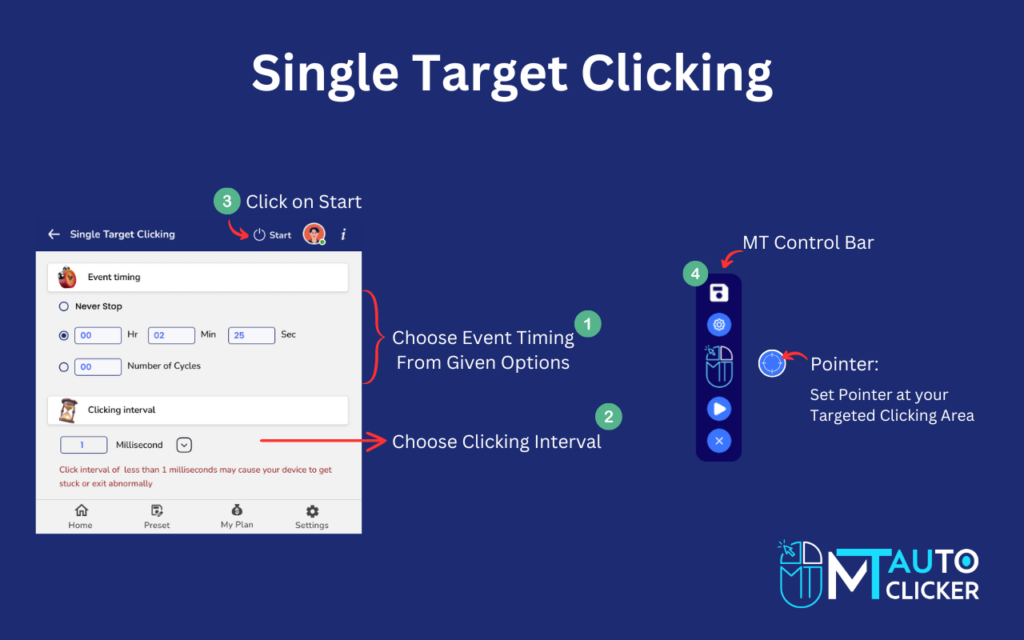
Best for:
- Idle games
- Simple resource farming
This setup focuses all clicks on one location for maximum output.
2. Multi-Point Clicking
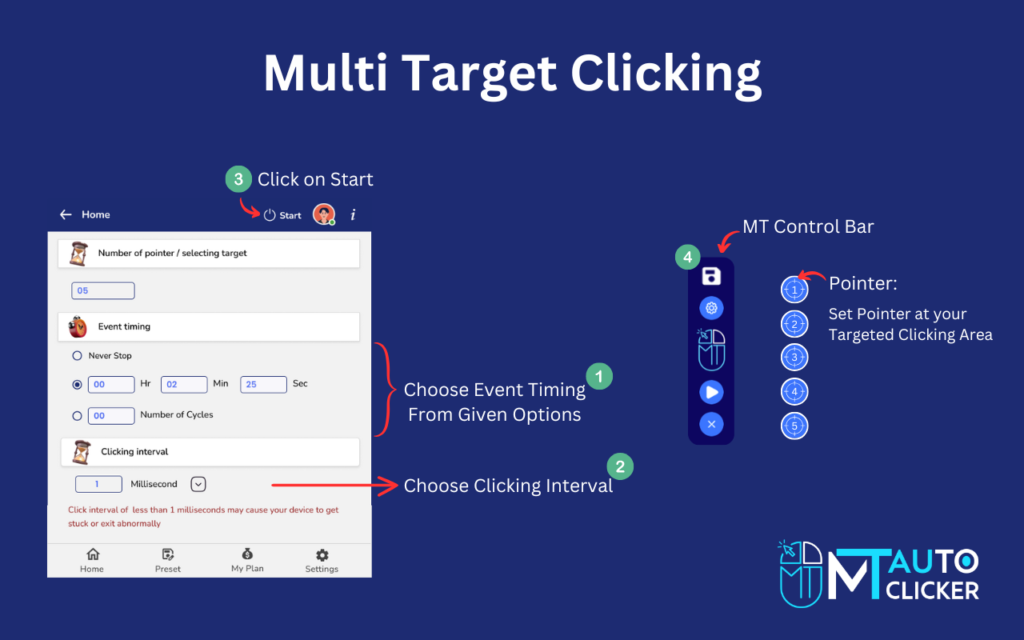
Best for:
- Strategy games
- Games with multiple buttons
Multi-Point Clicking allows you to automate several actions at once, increasing efficiency and saving time.
Perfecting Click Position Accuracy
Accuracy is just as important as speed. If your clicks land in the wrong place, your automation becomes ineffective.
Tips for Better Accuracy
- Use fixed coordinates
- Align click points precisely with buttons.
- Test positions before running long sessions.
Even small misalignments can significantly reduce performance.
Optimizing Click Intervals and Delays
Click intervals control how frequently clicks occur. Proper timing is essential for smooth operation.
Why Timing Matters?
- Prevents system overload
- Matches game processing speed
- Improves stability
Best Practices
- Avoid zero-delay settings.
- Use realistic intervals.
- Adjust based on how the game responds.
Balanced timing ensures consistent results.
Using Hotkeys for Better Control
Hotkeys allow you to control your auto clicker settings instantly.
Advantages
- Quickly start or stop automation.
- Prevent unwanted actions.
- Adjust settings on the fly.
Assign easy-to-reach keys for better control during gameplay.
Loop and Duration Configuration
Loop settings determine how long the auto clicker settings runs.
Options
- Infinite loops for continuous farming
- Limited loops for specific tasks
How to Use Them?
- Use infinite loops for idle progression.
- Use limited loops when targeting specific goals.
This flexibility helps you control automation effectively.
Reducing System Load
Running an auto clicker settings continuously can impact your device’s performance.
Optimization Tips
- Close unnecessary background apps
- Use lightweight auto clickers settings.
- Avoid extremely high speeds.
Keeping your system optimized ensures smooth gameplay.
Advanced Settings for Faster Progress
If you want to take your automation to the next level, consider advanced configurations.
- Multi-Action Sequences: Automate a series of actions instead of a single click.
- Conditional Clicking: Adjust behavior based on game events.
- Script-Based Automation: Use scripts for complex workflows and maximum efficiency.
These features are ideal for experienced users.
Common Mistakes to Avoid
Even experienced users can make mistakes when setting up auto clickers settings.
- Using Maximum Speed: Too much speed can reduce effectiveness.
- Ignoring Game Limits: Each game has its own processing capacity.
- Poor Click Placement: Incorrect positioning leads to wasted actions.
- Skipping Testing: Always test your setup before long sessions.
Avoiding these mistakes ensures better results.
Safety and Fair Play
While auto clickers can improve performance, they should be used responsibly.
- Follow Game Rules: Some games restrict automation tools.
- Avoid Competitive Use: Using Auto Clickers in multiplayer environments can lead to penalties.
- Keep It Fair: Use automation to reduce effort, not to gain unfair advantages.
Responsible usage ensures a better gaming experience.
Best Settings Overview
Here’s a quick summary of the most effective settings:
- Moderate click speed (not maximum)
- Accurate click placement
- Balanced intervals and delays
- Multi-point clicking for complex tasks
- Hotkeys for control
- Optimized system performance
These settings help you achieve faster and more efficient progress.
Future of Auto Clicker Optimization
Automation tools are constantly evolving. Future improvements may include:
- AI-based click optimization
- Smart timing adjustments
- Advanced scripting systems
- Better performance management
These advancements will make automation even more powerful.
Final Thoughts
Auto clickers settings are powerful tools for speeding up progress in click-based games, but the real advantage comes from proper configuration. By optimizing click speed, positioning, timing, and control settings, you can significantly improve your efficiency.
Remember, it’s not about clicking faster—it’s about clicking smarter. With the right setup, you can reduce effort, save time, and enjoy a smoother gaming experience.
Take the time to experiment with your auto clicker settings, find what works best for your game, and watch your progress accelerate like never before.