
In today’s fast-moving digital environment, efficiency matters more than ever. Many users spend a large portion of their day performing repetitive tasks like clicking, refreshing pages, submitting forms, or completing in-game actions.
While each click may seem small, the time and effort add up quickly. This is where automation tools step in to make life easier. One such powerful tool is Auto Clicker Software, which helps automate mouse clicks and eliminates the need for manual repetition.
Whether you are a gamer, developer, or office worker, this tool can simplify your workflow and improve productivity. In this article, we will explore how it works, its key features, real-world uses, and the advantages it offers.
Table of Contents
What is Auto Clicker Software?
At its core, an Auto Clicker is a simple program that automates mouse clicking based on user-defined settings. Instead of physically clicking the mouse multiple times, the software performs those clicks automatically.
The main purpose of Auto Clicker Software is to save time and reduce effort by automating repetitive tasks. Users can configure the tool to click at specific intervals, locations, and durations, making it highly flexible for different scenarios.
How Auto Clicker Software Works?
Auto clickers function by simulating mouse input. Once you set the parameters—such as click speed, click type, and position—the software follows those instructions precisely.
For example, you can set it to click every second or even multiple times per second. This level of control makes Auto Clicker Software suitable for both simple and complex tasks. Most tools also provide hotkeys, allowing you to start or stop the clicking process instantly.
Key Features of Auto Clicker Software
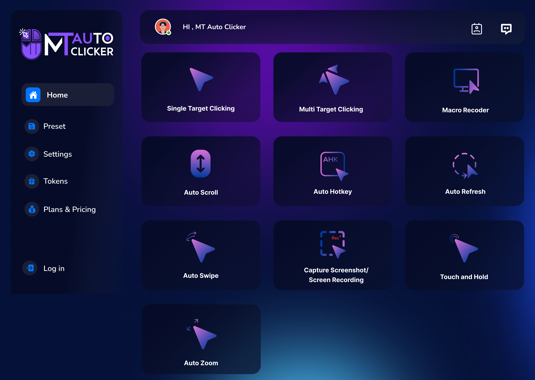
1. Customizable Click Speed
One standout feature is the ability to adjust how quickly clicks occur. You can choose slow intervals for careful tasks or high-speed clicking for demanding activities. This flexibility ensures that Auto Clicker Software can adapt to different user needs.
2. Multiple Click Options
Users can select between single-click, double-click, or right-click actions. This makes the tool versatile and suitable for a wide range of applications.
3. Hotkey Controls
Hotkeys make it easy to control the software without interrupting your workflow. You can start or stop the automation instantly with a keyboard shortcut.
4. Fixed and Dynamic Click Positions
You can set the click to occur at a fixed point on the screen or follow your cursor. This feature adds convenience and improves usability.
5. Repeat Settings
Auto clickers let you choose whether clicks should repeat a specific number of times or continue indefinitely until stopped.
Uses of Auto Clicker Software
1. Gaming
Gaming is one of the most popular areas where auto clickers are used. Many games require rapid clicking or repetitive actions such as collecting resources or upgrading items.
With Auto Clicker Software, players can automate these actions, focusing more on strategy rather than constant clicking. This not only improves performance but also reduces fatigue during long gaming sessions.
2. Software Testing
Developers and testers often need to perform the same actions repeatedly to check application functionality. Auto clickers can simulate user interactions efficiently. Using Auto Clicker Software, testers can ensure consistent results and save valuable time during testing.
3. Office and Productivity Tasks
In office environments, repetitive tasks like data entry, form filling, and file management are common. Automating these actions can significantly improve efficiency. By using Auto Clicker Software, employees can complete tasks faster and with fewer errors, thereby improving productivity.
4. Online Activities
Auto clickers can also be used for tasks such as refreshing web pages, clicking buttons, or performing bulk actions online. This makes them useful for both personal and professional purposes.
Advantages of Using Auto Clicker Software
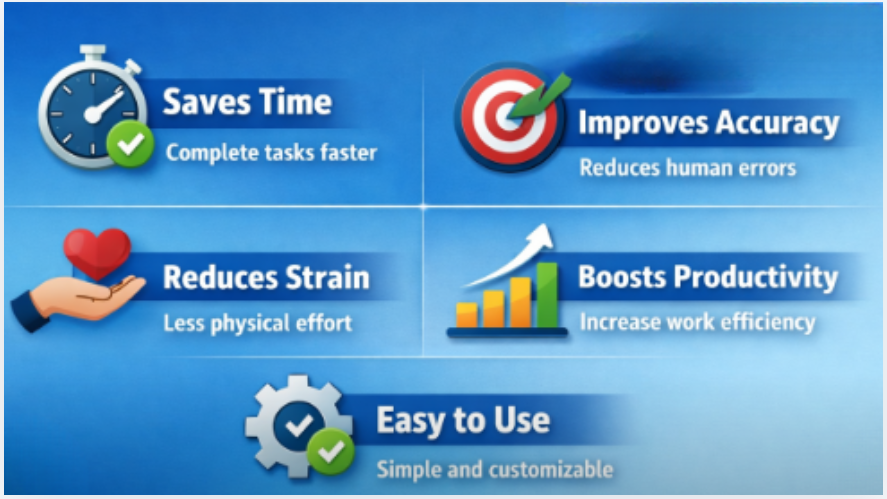
- Saves Time: Automation drastically reduces the time required to complete repetitive tasks. What might take hours manually can be done in minutes.
- Improves Accuracy: Manual work often leads to mistakes, especially when tasks are repetitive. Auto clickers perform actions consistently, ensuring accuracy.
- Reduces Physical Strain: Continuous clicking can cause discomfort in your fingers and wrists. Using Auto Clicker Software helps prevent strain and allows for longer working sessions without fatigue.
- Enhances Productivity: By automating routine tasks, users can focus on more important and creative work. This leads to better overall productivity.
- Easy to Use: Most auto clickers have simple interfaces, making them easy to use even for beginners.
Tips for Using Auto Clicker Effectively
- Set realistic click speeds to avoid issues in restricted platforms.
- Test your settings before running long tasks.
- Use hotkeys for better control.
- Avoid overusing automation where human judgment is required.
These tips will help you get the best performance from Auto Clicker Software.
Things to Consider Before Using
While auto clickers are highly useful, it is important to use them responsibly. Some platforms, especially games, may restrict the use of automation tools. Always check the rules before using them.
Additionally, download software only from trusted sources to avoid security risks. When used properly, Auto Clicker Software is safe and effective.
The Future of Auto Clicker Tools
Automation technology is evolving rapidly. Modern tools are becoming smarter and more efficient, with advanced customization options and better user interfaces.
In the future, Auto Clicker Software may include AI-based features that allow it to adapt to user behavior and perform tasks even more intelligently. This will further enhance productivity and make automation more accessible.
Conclusion
Repetitive tasks are a common part of digital work, but they don’t have to consume your time and energy. Auto clickers provide a simple, effective way to automate these tasks and improve efficiency.
By using Auto Clicker Software, you can save time, reduce effort, and increase productivity in both personal and professional activities. Whether you are gaming, testing software, or handling daily tasks, this tool can make a significant difference.
Start exploring automation today and experience how a small tool can make a big impact on your workflow.