
In the world of click-based and incremental games, efficiency determines how quickly you advance. While manual clicking may work in early stages, long-term progression often requires smarter solutions.
An optimized auto clicker setup can dramatically improve performance, reduce repetitive strain, and help players focus on strategy rather than constant tapping.
This guide explains how to configure the ideal auto clicker setup to maximize progress while maintaining balance and control.
Table of Contents
Why Auto Clicker Setup Matters?
Many players download an automation tool and immediately activate it at maximum speed. However, without proper configuration, automation may become inefficient or even counterproductive. A well-planned auto clicker ensures:
- Controlled click speed
- Optimized resource generation
- Reduced system strain
- Better strategic gameplay
The difference between casual automation and a structured auto clicker setup can significantly impact long-term progress.
Maximizing Progress with the Right Auto Clicker Setup
Step 1: Choosing the Right Tool
Before adjusting settings, selecting a compatible tool is crucial. Your auto clicker should match your platform:
- Windows for advanced scripting and precision
- Android for mobile tap automation
- Browser-based tools for lightweight tasks
Make sure the software supports adjustable speed, hotkeys, and multi-point clicking. These features are foundational to an effective auto clicker setup.
Step 2: Configuring Click Speed Properly
Speed is one of the most misunderstood elements of automation. Many assume faster is always better. However, the best auto clicker setup balances speed with stability.
Consider:
- The game’s click recognition limit
- System performance capability
- Server response time (for online games)
Start with a moderate click rate (CPS) and gradually increase. A properly tuned auto clicker setup avoids unnecessary lag while maintaining high efficiency.
Step 3: Using Multi-Point Clicking
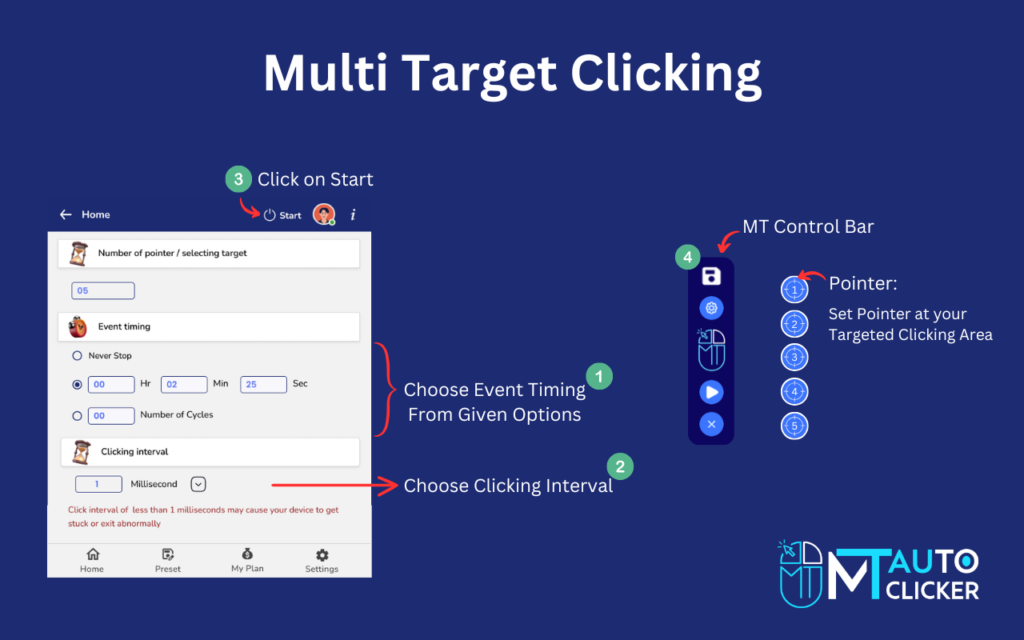
In many click-based games, important actions occur in different screen areas. An advanced auto clicker includes multi-point configuration.
This allows you to:
- Click resource buttons
- Activate upgrades
- Collect rewards
- Trigger bonus features
By mapping multiple click zones, your auto clicker setup becomes smarter and more productive.
Step 4: Hotkeys for Better Control
Hotkeys are essential for safety and convenience. A practical auto clicker setup should include:
- Start/Stop hotkey
- Pause function
- Emergency termination key
Quick control lets you adjust automation instantly during critical gameplay moments.
Step 5: Balancing Automation with Strategy
Automation should support strategy, not replace it. A thoughtful auto clicker setup allows players to:
- Automate repetitive farming
- Focus on upgrade optimization
- Plan prestige resets
- Monitor milestone progression
Over-automation can reduce engagement. The best approach combines smart automation with active decision-making.
Step 6: Monitoring Performance
An effective auto clicker requires performance monitoring. Keep track of:
- CPU usage
- RAM consumption
- System temperature
- Game responsiveness
If performance drops, reduce click intervals or simplify automation loops. Stability is more important than extreme speed.
Step 7: Optimizing for Idle Progression
Many incremental games include idle systems. Instead of constant high-speed clicking, your auto clicker setup can work alongside idle mechanics.
For example:
- Use automation only during active multipliers
- Let idle systems handle passive income
- Schedule automation for specific intervals
Strategic timing enhances efficiency without unnecessary repetition.
Step 8: Custom Timing Intervals
Rather than continuous clicking, advanced users configure timed cycles. A flexible auto clicker setup might:
- Click for 30 seconds
- Pause briefly
- Resume during bonus phases
Timed automation reduces strain and aligns with game mechanics.
Step 9: Safety and Responsible Use
Responsible configuration is part of any reliable auto clicker. Always:
- Download tools from trusted sources
- Review game policies
- Avoid violating platform rules
- Use moderation
Safe practices ensure long-term enjoyment without risks.
Step 10: Testing and Fine-Tuning
The best auto clicker setup evolves over time. Testing helps identify:
- Optimal click speed
- Most efficient upgrade paths
- Balanced automation patterns
Small adjustments can significantly improve outcomes.
Common Mistakes in Auto Clicker Setup
To maximize progress, avoid these common errors:
- Setting the click speed too high
- Ignoring system performance
- Automating every action
- Forgetting to monitor game changes
A disciplined auto clicker setup avoids these pitfalls and focuses on efficiency.
Advanced Setup Techniques
Experienced users can enhance their auto clicker with:
- Script recording
- Conditional triggers
- Loop customization
- Multi-stage automation
These techniques provide deeper control, especially in complex incremental games.
Physical Comfort and Ergonomics
Even with automation, comfort matters. A well-designed auto clicker setup reduces physical strain by minimizing manual interaction. Maintain:
- Proper seating posture
- Comfortable mouse positioning
- Periodic breaks
Automation should improve comfort, not encourage unhealthy gaming habits.
Long-Term Progress Strategy
An optimized auto clicker supports sustainable progression. Instead of short bursts of rapid growth followed by stagnation, structured automation encourages steady advancement. Combine automation with:
- Upgrade prioritization
- Resource planning
- Timely prestige resets
- Goal-oriented sessions
Long-term thinking transforms a basic auto clicker setup into a strategic tool.
Final Thoughts
A powerful auto clicker setup is not about maximizing clicks per second — it’s about maximizing efficiency. By carefully selecting the right tool, configuring speed responsibly, using multi-point mapping, and balancing automation with strategy, players can significantly accelerate progress in click-based games.
The right configuration reduces repetitive strain, improves gameplay flow, and enhances long-term satisfaction. When optimized thoughtfully, an auto clicker setup becomes a strategic advantage rather than just a convenience tool.