

Automation tools have become an important part of modern digital workflows. From gaming environments to productivity tasks, many activities require repeated clicking that can quickly become exhausting and inefficient when done manually.
This is where auto clicker engineering comes into play. Instead of simply running a basic auto clicker, advanced users focus on optimizing automation systems for accuracy, efficiency, and precision.
Understanding the engineering principles behind automated clicking allows users to create highly controlled workflows that perform repetitive tasks without unnecessary effort. With the right configuration and strategies, auto clicker engineering can significantly improve performance in both gaming and professional environments.
This article explores advanced techniques used in auto clicker engineering and how they help create more precise and efficient automation systems.
Table of Contents
Understanding the Concept of Auto Clicker Engineering
At its core, auto clicker engineering refers to the structured design and optimization of automated clicking systems. Rather than treating an auto clicker as a simple tool, advanced users approach it as a configurable system with multiple adjustable parameters.
These parameters include click speed, timing intervals, click locations, automation triggers, and performance stability. By adjusting these elements carefully, users can build automation setups that perform specific tasks with high accuracy.
Auto clicker engineering focuses on creating automation that behaves predictably and efficiently. This approach reduces errors and ensures that automated clicks produce consistent results over long sessions.
Advanced Techniques for Precision Clicking
1. Precision Timing and Click Interval Optimization
One of the most important aspects of auto clicker engineering is controlling click timing. Many users assume that faster clicking always produces better results, but this is not always true.
Different applications and games process inputs at specific rates. If an auto clicker sends clicks too quickly, some inputs may be ignored or delayed. This leads to wasted processing power and inconsistent outcomes.
Advanced users carefully tune the click interval so that each automated click is properly registered. Precision timing ensures that every action contributes to the intended result. This type of optimization improves reliability and keeps automation stable during long-running tasks.
In many cases, balanced click intervals perform better than extremely high-speed clicking.
2. Multi-Point Automation Systems
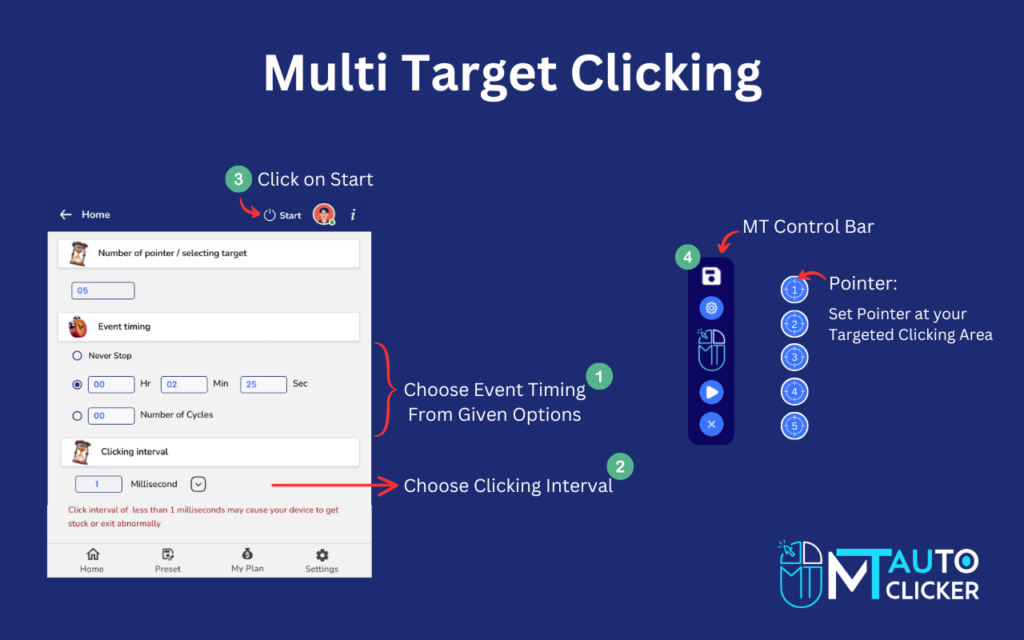
Another important technique in auto clicker engineering is the use of multi-point automation. Many interfaces contain several interactive areas where clicks can trigger different actions.
Instead of automating a single button, advanced users configure multiple click points that activate various tasks simultaneously. For example, one click point may generate resources while another activates upgrades or processes commands.
Multi-point systems transform simple automation into a coordinated workflow. This technique allows multiple processes to run at the same time, significantly improving productivity and game progression. By carefully mapping click positions and timing intervals, users can create highly efficient automation loops that handle complex tasks automatically.
3. Precision Targeting and Coordinate Control
Auto clicker engineering also involves precise control of screen coordinates. Accurate targeting ensures that automated clicks always land on the correct interface element.
Small positioning errors can cause automation failures, especially when working with dynamic interfaces or moving elements. Advanced users solve this problem by carefully calibrating click coordinates and testing them under different conditions.
Many automation tools allow users to define exact pixel positions or create adjustable click zones. These features help ensure that automated clicks remain accurate even when screen layouts change slightly. Precision targeting is especially important when automating tasks that require consistent interaction with specific buttons or menu items.
4. Hotkey Integration and Control Systems
Another important part of auto clicker engineering is the integration of control systems such as hotkeys. Hotkeys allow users to activate or deactivate automation instantly without interrupting their workflow.
For example, a user may configure a keyboard shortcut to start the auto clicker during repetitive tasks and stop it when manual control is required. This flexibility ensures that automation can be adjusted quickly depending on the situation.
Hotkey systems also improve safety and usability. If something unexpected happens during automation, users can stop the process immediately without navigating through menus. This level of control is essential for advanced automation setups.
5. Adaptive Automation Strategies
Advanced users often design adaptive automation systems that respond to changing conditions. Instead of running the same click pattern continuously, the automation process can be adjusted depending on progress or system behavior.
For example, a workflow may use slower click intervals during setup phases and faster intervals when processing large batches of actions. This adaptability allows the automation system to operate efficiently across different stages of a task.
Adaptive strategies also help reduce unnecessary system load. By adjusting click patterns dynamically, users can maintain performance while avoiding excessive resource consumption. Auto clicker engineering focuses on creating flexible systems rather than rigid automation scripts.
Performance Monitoring and Optimization
Running automated clicking processes for long periods requires proper monitoring. Advanced users regularly evaluate how their automation system performs during extended sessions.
Performance monitoring includes checking CPU usage, response times, and application stability. If the system begins to lag or behave unpredictably, adjustments can be made to restore optimal performance.
Reducing click frequency, simplifying automation loops, or adjusting target coordinates can often resolve performance issues. Continuous optimization ensures that the automation system remains stable and effective. Auto clicker engineering treats automation as an evolving system that can be refined and improved over time.
Combining Automation with Strategic Control
While automation is powerful, experienced users understand that not every action should be automated. Some tasks require human judgment or strategic decisions.
For example, selecting upgrades, managing resources, or responding to unexpected events may require manual input. Smart automation systems allow users to handle repetitive tasks while maintaining control over important decisions.
This balance between automation and manual control creates a more efficient workflow. Instead of replacing human input completely, automation enhances productivity by removing unnecessary repetition. Auto clicker engineering focuses on supporting user decisions rather than replacing them.
Security and Responsible Use
When implementing advanced automation systems, users should always consider security and responsible usage. Downloading automation tools from reliable sources helps prevent compatibility problems and potential risks.
Additionally, users should review application policies before using automation tools. Some platforms may restrict automated inputs, particularly in competitive environments. Responsible use ensures that automation remains a helpful productivity tool rather than causing technical or policy-related issues.
Future Trends in Click Automation
Automation technology continues to evolve as software becomes more sophisticated. Modern auto clicker tools are beginning to integrate advanced features such as script-based workflows, visual detection systems, and intelligent automation triggers. These innovations are transforming simple clicking tools into powerful automation platforms capable of handling complex digital tasks.
As these technologies develop, auto clicker engineering will become even more important. Understanding automation principles will allow users to take full advantage of emerging tools and capabilities.
Final Thoughts
Auto clicker engineering goes far beyond basic automation. By applying advanced techniques such as precision timing, multi-point clicking, coordinate control, and adaptive strategies, users can create highly efficient systems for handling repetitive tasks.
These techniques help transform simple auto clickers into powerful automation solutions capable of improving productivity and gaming performance. Instead of relying on random clicking patterns, engineered automation systems focus on accuracy, stability, and strategic integration.
When used thoughtfully, auto clicker engineering enables users to reduce repetitive effort while maintaining full control over their workflow. With the right setup and continuous optimization, automated clicking can become a precise and reliable tool for achieving better results in digital environments.