
Automation tool have become an essential part of modern digital workflows. Many computer tasks require repetitive clicking, which can quickly become inefficient when done manually.
Auto clickers solve this problem by automating mouse clicks and allowing users to focus on more important activities. However, advanced users often go beyond simple automation by building structured auto clicker control systems that offer better precision, efficiency, and customization.
Auto clicker control systems involve configuring automation tools in a way that allows users to manage clicking behavior, timing, triggers, and performance with greater accuracy.
Instead of relying on basic click automation, advanced configuration enables users to create powerful automation workflows that improve productivity and performance in gaming, testing, and digital operations.
This article explores how auto clicker control systems work, the components involved in advanced automation setups, and how users can configure them effectively.
Table of Contents
Understanding Auto Clicker Control Systems
An auto clicker control system is a structured setup in which automated clicking is controlled by configurable parameters and triggers. Rather than running a simple click loop, users design a system that controls when, where, and how clicks occur.
These systems allow automation to operate more intelligently by adjusting clicking behavior based on user preferences or task requirements. Typical components of auto clicker control systems include:
- Click interval management
- Multi-point click configuration
- Trigger controls such as hotkeys
- Automation timing systems
- Performance monitoring
By combining these elements, users can create flexible automation systems that perform tasks efficiently without constant supervision.
Importance of Advanced Configuration
Basic auto clickers work well for simple tasks, but advanced configuration offers several additional benefits. A properly designed auto clicker control system can improve accuracy, reduce errors, and enhance overall automation efficiency.
Advanced configuration allows users to:
- Control click frequency precisely.
- Automate multiple interface elements.
- Start and stop automation instantly.
- Maintain stable performance during long sessions.
These improvements make automation tools far more powerful than simple repetitive click programs.
Click Interval and Timing Control
One of the most important aspects of any auto clicker control system is click interval management. The click interval determines how fast the automated clicks occur.
Many users assume that faster clicking always produces better results, but this is not always true. Some applications or games process input at specific rates. If clicks occur too quickly, the system may ignore some inputs.
Advanced users carefully adjust the click interval to ensure each automated action is registered correctly. Balanced timing improves accuracy and prevents unnecessary system load. Fine-tuning the click interval is one of the first steps in building an efficient automation system.
Multi-Point Click Automation
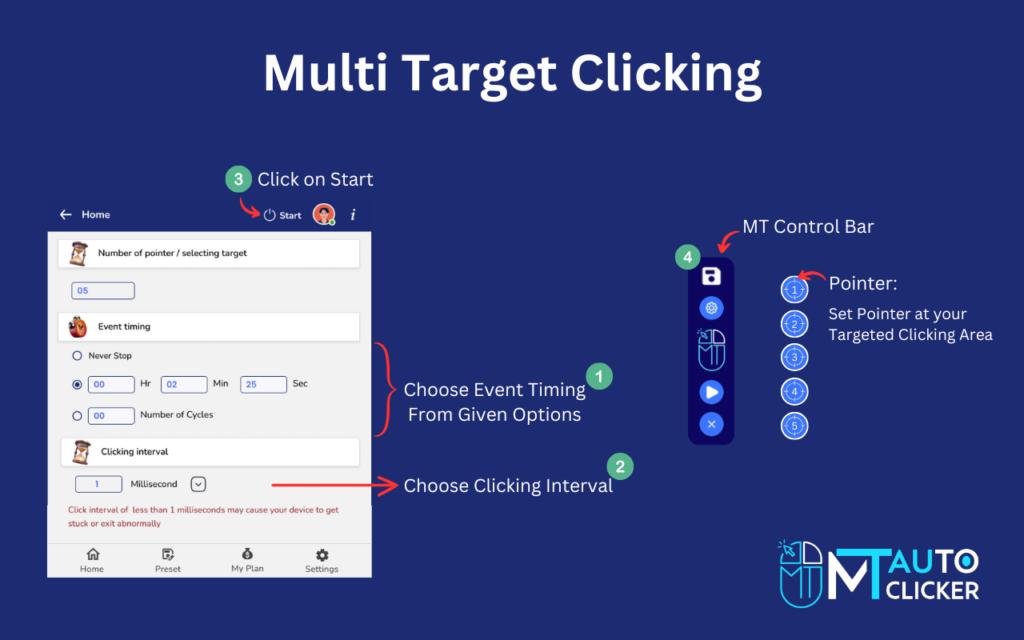
Another important feature in auto clicker control systems is multi-point automation. Many applications require users to interact with multiple elements on the screen.
For example, a game interface may contain buttons for upgrades, resource generation, and actions. Instead of automating only one button, advanced auto clickers allow users to configure multiple click points.
Multi-point automation enables the system to perform several actions simultaneously. This approach greatly increases efficiency because different tasks can run in parallel.
Users can define precise screen coordinates for each click location and assign different intervals for each point. This creates a highly customized automation workflow.
Hotkey-Based Control Systems
Hotkeys are another essential component of advanced automation setups. A hotkey is a keyboard shortcut that instantly activates or stops the auto clicker.
In auto clicker control systems, hotkeys act as command triggers. Instead of navigating through the software interface every time, users can control automation with a simple key press.
For example:
- One hotkey can start the automation process.
- Another hotkey can stop the clicking activity.
- Additional hotkeys may switch between automation modes.
This level of control makes automation more flexible and user-friendly. Hotkey systems are especially useful during gaming sessions or testing workflows where quick control is required.
Conditional Automation Strategies
Advanced automation setups often use conditional strategies in which the click behavior changes depending on the task or environment. For example, the automation system may:
- Increase click speed during active phases.
- Slow down clicking when waiting for system responses.
- Switch click positions after completing certain actions.
These adaptive strategies enable automation to respond to changing conditions rather than repeating the same pattern continuously. Conditional automation improves efficiency and reduces unnecessary actions, making the overall system smarter and more effective.
Precision Coordinate Mapping
Precision is critical when configuring auto clicker control systems. If automated clicks occur in the wrong location, the automation process may fail. Advanced users carefully map screen coordinates to ensure accurate targeting. Many auto clicker tools offer coordinate-tracking features that let users record exact click positions.
Testing the coordinate setup is important because small interface changes can affect click accuracy. Some users create adjustable click zones instead of fixed points to improve reliability. Precision coordinate mapping ensures that the automation system consistently interacts with the correct interface elements.
Performance Monitoring and Optimization
Long automation sessions can sometimes affect system performance. For this reason, advanced users monitor how the automation tool behaves during extended use.
Performance monitoring helps identify issues such as:
- High CPU usage
- Application lag
- Delayed click responses
If performance problems occur, users can adjust the click interval or reduce the number of automation points. Optimization ensures that auto clicker control systems remain stable and efficient during long workflows or gaming sessions.
Integrating Automation with Workflow Management
One of the most powerful aspects of advanced auto clicker configuration is integrating automation into broader workflow systems. Instead of running isolated click loops, users can design automation that supports a larger process. For example:
- Testing teams may automate repetitive interface interactions.
- Gamers may automate resource generation while managing upgrades manually.
- Data entry workflows may automate repetitive clicking during form navigation.
By combining automation with manual decision-making, users can create balanced workflows that maximize efficiency without losing control.
Security and Responsible Usage
While automation tools provide powerful capabilities, users should always use them responsibly. Some platforms may restrict automated inputs, especially in competitive environments. Before configuring advanced auto clicker control systems, users should review the policies of the application or platform they are using.
Security considerations are also important when downloading automation tools. Always choose reliable software sources and scan downloaded files to ensure system safety. Responsible usage ensures that automation tools remain helpful rather than disruptive.
Future Developments in Click Automation
Automation technology continues to evolve as new tools introduce smarter features and improved customization options. Future auto clicker control systems may include advanced capabilities such as intelligent automation triggers, visual element detection, and script-based workflows.
These technologies will allow automation tools to perform more complex tasks with greater precision and adaptability. As automation continues to improve, users who understand advanced configuration techniques will be able to take full advantage of these innovations.
Final Thoughts
Auto clickers are simple tools at their core, but with advanced configuration, they can become powerful automation systems. By building structured auto clicker control systems, users can control click timing, locations, and triggers with high precision.
Techniques such as multi-point automation, hotkey controls, coordinate mapping, and performance monitoring allow users to create efficient and reliable automation workflows.
When designed properly, these systems reduce repetitive effort while maintaining full control over digital tasks. Whether used for gaming, testing, or productivity purposes, advanced auto clicker configuration helps users achieve better results with less manual effort.
Understanding and applying these automation strategies transforms a basic auto clicker into a sophisticated tool capable of handling complex digital workflows.