
In 2026, gaming has evolved into a highly competitive and system-driven experience across both PC and consoles. Modern games demand precision, repetition, and long progression cycles.
From idle-style mechanics inside RPGs to resource farming in open-world games, repetitive inputs remain common. As a result, the gaming auto clicker has become an increasingly discussed tool among players looking to manage repetitive in-game actions more efficiently.
A gaming auto clicker is designed to simulate repeated mouse clicks or button presses automatically. Whether used on PC or adapted carefully for console environments, this type of game automation clicker helps reduce mechanical strain while maintaining consistent input timing.
In this guide, we will explore how auto clicker gaming works in 2026, how to set it up properly, and how experienced players use automation responsibly.
Table of Contents
What Is a Gaming Auto Clicker?
A gaming auto clicker is a software-based or hardware-assisted tool that automates repetitive inputs during gameplay. On PC, this often means automated mouse clicks. On consoles, it may involve programmable controllers or adaptive input devices.
Unlike general automation software, a video game auto clicker is typically configured for specific in-game mechanics such as:
- Repeated attacks
- Resource farming
- Idle combat sequences
- Crafting loops
- Grinding-based progression systems
The purpose of a game automation clicker is not to replace strategic gameplay, but to handle repetitive mechanical input that does not require active decision-making.
Why Auto Clicker Gaming Is Growing in 2026?
Modern games increasingly incorporate progression systems that require repetition. Even competitive titles often include training modes or farming mechanics that require repeated input.
Players use auto clicker for gaming in situations such as:
- Idle damage farming
- Loot grinding
- Skill leveling loops
- Crafting repetition
- Long-duration resource accumulation
In these contexts, a gaming productivity tool reduces fatigue and allows players to focus on strategic decisions rather than repetitive clicking. The growth of automation tools reflects a broader shift in gaming: efficiency is becoming as important as skill.
PC Gaming Auto Clicker Setup (2026 Guide)
PC remains the most flexible platform for auto clicker gaming. The open nature of the operating system allows for precise configuration.
Step 1: Choose a Reliable Tool

Select a trusted gaming automation tool designed specifically for PC compatibility from our site. Avoid unofficial or unsafe downloads.
Step 2: Configure Click Interval
Set clicks per second or custom delay timing depending on the game’s mechanics.
Step 3: Assign Click Location
Choose fixed cursor positions or dynamic tracking if supported.
Step 4: Hotkey Activation
Set keyboard shortcuts to start and stop the automation instantly.
Step 5: Test at Safe Speed
Start with moderate click intervals to ensure stability and avoid system overload.
Advanced gaming auto clicker setup options in 2026 may include:
- Multi-click sequences
- Randomized delay for natural timing
- Hold-and-release simulation
- Scripted input loops
PC users benefit from customization and precision, making it the preferred platform for advanced video game automation clicker configurations.
Console Gaming Auto Clicker Setup
Console automation requires a different approach because consoles restrict direct software automation.
Hardware-Based Automation
For consoles, automation often involves:
- Programmable controllers
- Adaptive input devices
- External macro-enabled hardware
These devices simulate button presses rather than running software directly on the console.
Important Considerations
- Ensure the hardware complies with console guidelines.
- Avoid automation in competitive multiplayer modes.
- Use primarily for single-player or offline farming systems.
While console automation is more limited compared to PC, modern hardware solutions provide controlled game clicking automation without modifying system software.
Gaming Automation Tool Features in 2026
Modern gaming auto clicker tools include advanced features designed for safety and precision.
- Adjustable Click Speed: Control how fast clicks occur to match in-game cooldowns.
- Multi-Input Simulation: Automate combinations of mouse and keyboard inputs.
- Loop Programming: Repeat a sequence for fixed durations.
- Randomized Timing: Prevent perfectly uniform clicks for more natural patterns.
- Pause & Resume Controls: Allow manual override instantly.
- Performance Monitoring: Track CPU usage and stability during long sessions.
These improvements make auto clicker gaming more refined and controlled than early basic click spammers.
Responsible Use of Game Automation Clicker
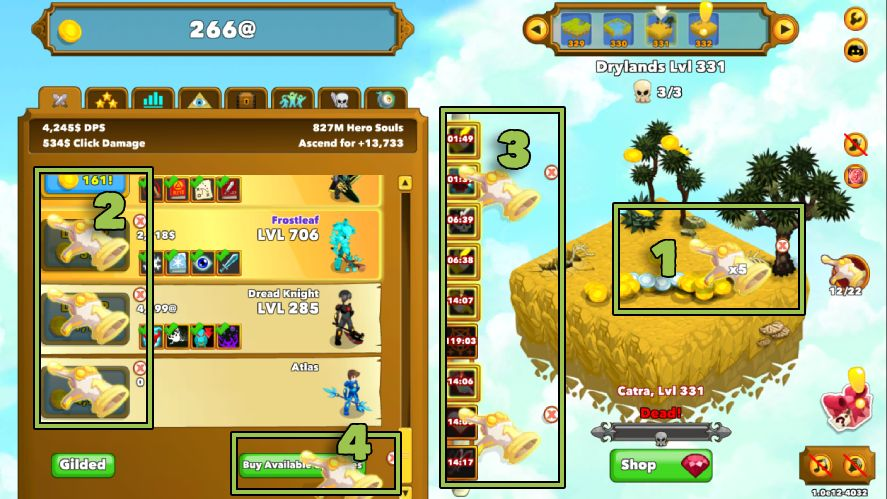
Automation must always be used responsibly. Many competitive online games prohibit automation tools. Using a video game auto clicker in multiplayer ranked environments can lead to penalties.
Safe use cases include:
- Single-player games
- Offline progression systems
- Idle mechanics
- Personal experimentation
- Accessibility support
Automation should enhance efficiency—not create unfair advantages. Experienced players use a gaming productivity tool only when repetition adds no strategic value.
Benefits of Using an Auto Clicker for Gaming
- Reduced Physical Strain: Repetitive clicking can cause wrist and finger fatigue. Automation protects long-term comfort.
- Increased Consistency: Machines maintain perfect timing during farming loops.
- Time Efficiency: Allows players to manage other aspects of gameplay.
- Strategic Focus: Players concentrate on optimization instead of mechanics.
- Controlled Grinding: Ideal for long-duration progression tasks.
In 2026, gaming is increasingly about intelligent resource management. A well-configured gaming auto clicker setup supports that goal.
When NOT to Use a Gaming Auto Clicker?
Automation is not always appropriate.
Avoid using it:
- In competitive multiplayer modes
- Where terms of service prohibit it
- During skill-based combat
- In reaction-based gameplay
A video game automation clicker is most effective in predictable, low-decision scenarios. If the game requires real-time judgment, automation may reduce engagement rather than improve it.
Advanced Gaming Auto Clicker Setup Tips (2026)
Experienced players follow specific guidelines:
- Match Cooldowns: Set click intervals aligned with in-game ability cooldowns.
- Avoid Maximum Speed: Excessive speed can cause instability or detection.
- Use Smart Loops: Combine click sequences with timed pauses.
- Monitor Performance: Check system resource usage during long sessions.
- Stay Within Game Policies: Always review the game’s official rules.
A smart gaming automation tool setup balances efficiency with compliance.
The Future of Video Game Automation Clicker
Looking ahead, automation tools are becoming more intelligent. AI-assisted input optimization may adjust click intervals dynamically based on in-game conditions.
Future trends may include:
- Adaptive click timing
- Context-aware automation
- Built-in accessibility integration
- Cloud-based macro profiles
Automation will likely shift further toward productivity and accessibility support rather than pure grinding acceleration. In 2026 and beyond, auto clicker for gaming will continue evolving as games become more complex and system-driven.
Final Thoughts
The rise of the gaming auto clicker reflects a broader change in how players approach repetitive gameplay. Instead of enduring mechanical repetition, experienced gamers manage it strategically.
Whether on PC or console, a properly configured gaming auto clicker setup can reduce fatigue, increase efficiency, and allow greater focus on meaningful decisions.
However, automation should always be used responsibly and in accordance with platform guidelines. When applied correctly, a video game auto clicker becomes not a shortcut—but a tool for smarter, more sustainable gaming.
In the end, successful auto clicker gaming is not about replacing gameplay.
It is about optimizing the parts of gameplay that do not require constant human input—so players can focus on what truly matters: strategy, timing, and smart progression.